



From a hands-on run: we generated Halloween music on Enkio and carried a track through the full cover-to-MV flow, checking each step as it landed — October 20, 2026.
This page is not a playlist. We read the top results for halloween music this October before writing it: pre-made mixes, most of them hour-long videos, all handing your night to someone else's tracklist. Every sound below can be generated instead: you describe it, set the few choices that matter, and press play on halloween music fitted to your guests and your scare threshold.
Five sounds cover almost every Halloween night:
- A party track with a chorus guests want to shout along to
- A background bed that stays under the conversation
- A spooky ambience track for after dark
- A kid-safe song whose lyrics you wrote or approved first
- An orchestral piece with organ, bells, and shivering strings
Enkio covers the whole list, because one workflow makes the song and — if you want it — the video that goes with it.
Make the Halloween track your night is missing.
Describe it in plain words, pick a style or let the generator match one, and keep only the versions you love.
How to Generate Halloween Music with Enkio
Every track in this guide starts the same way: a plain-language description, a couple of optional choices, and one button. The four steps below are the full flow we ran for our own reference tracks.
Step 1: Describe the track in simple words
Open the AI Music Generator and describe the song you want the way you would describe it to a friend: "a bouncy Halloween party song about a haunted house with a friendly ghost," or "a slow, quiet piano bed with distant wind." If the track needs specific words — a party chant with your street name in it, a lyric sheet you have already approved — write them first and paste them in.
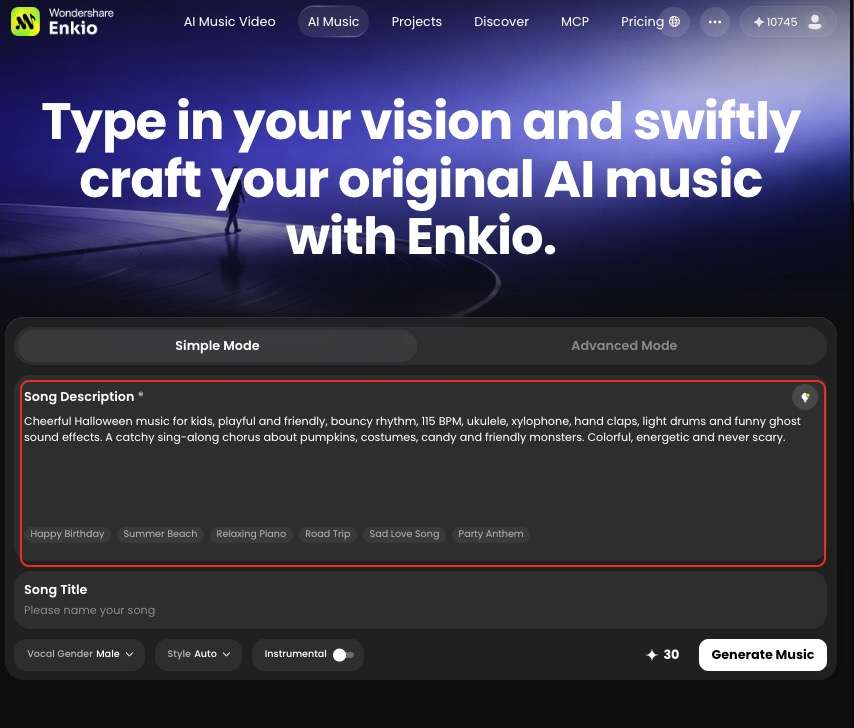
Short descriptions work. What matters is naming the job the track has to do: singalong, background, scare, or theme.
Step 2: Pick a vocal gender and style — or let it match for you
Under the description, you can choose a vocal gender and a style — there are about ten styles to pick from, including r&b, pop, and jazz. Choosing neither is a valid move: skip both, and the generator matches a fitting sound to your description on its own.
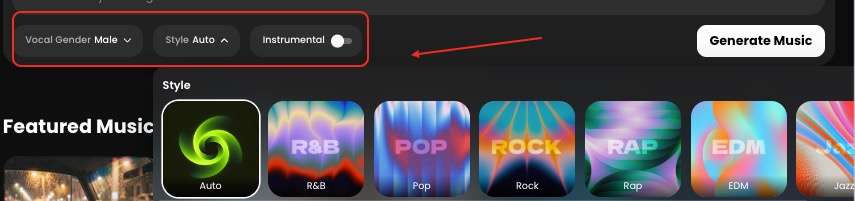
One choice matters more than the rest. If the track is not meant to be sung — a background bed, an ambience loop — choose the instrumental option, and the same flow returns the track with no vocals at all.
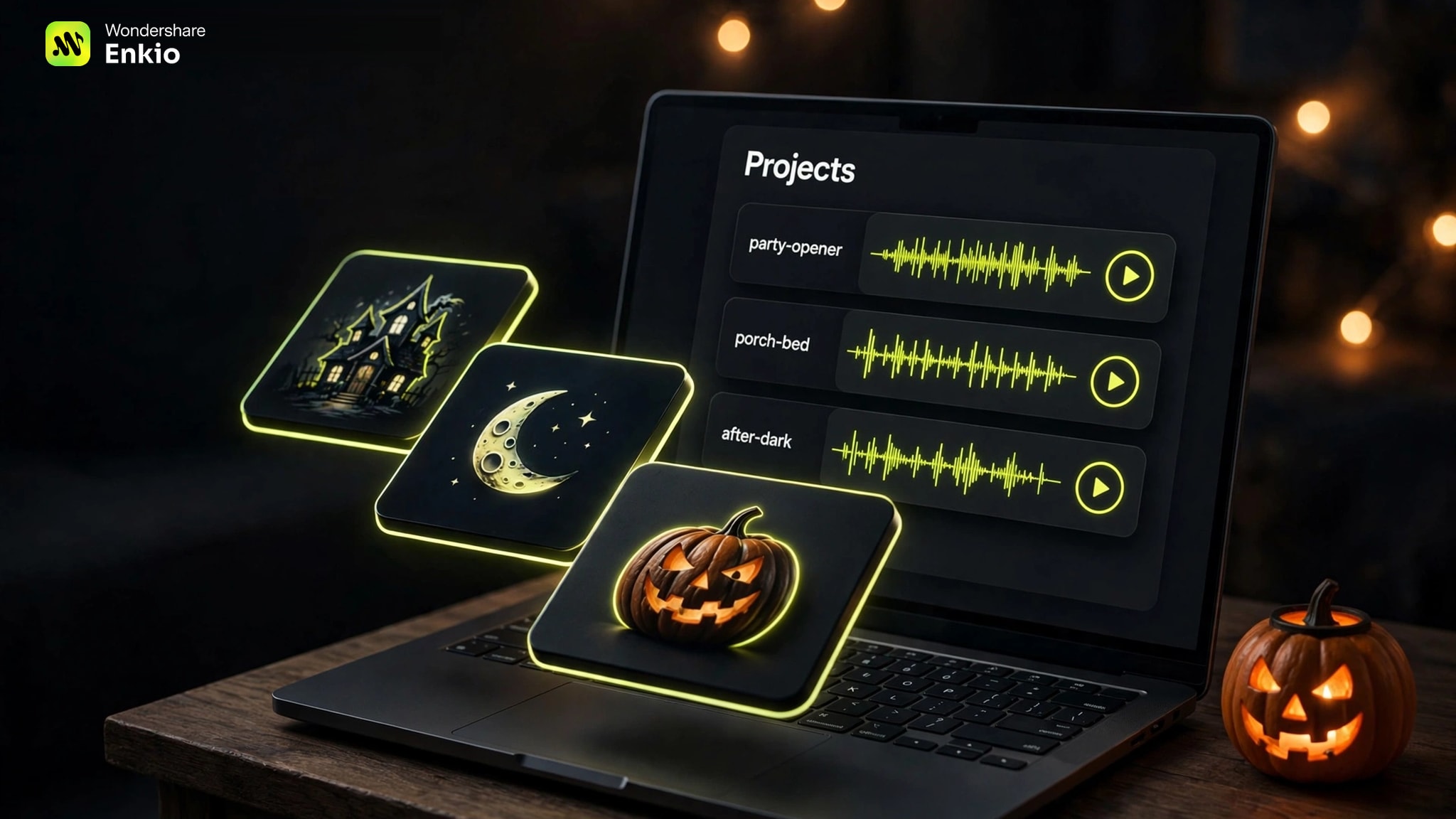
Step 3: Generate, then watch it land in Projects
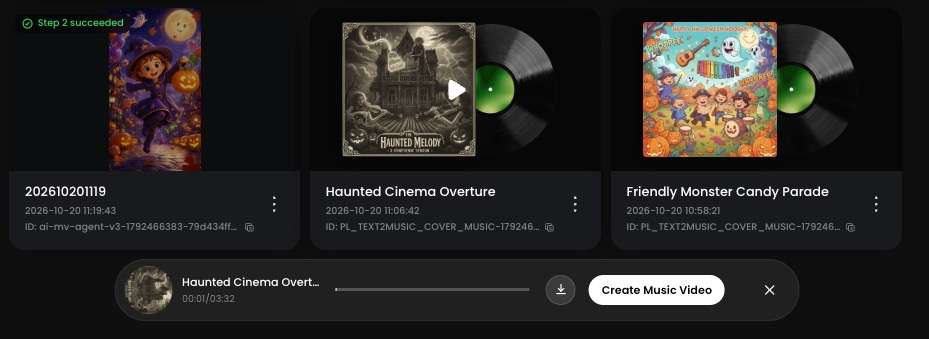
Hit Generate music and the job starts; its progress shows in Projects, so there is no progress bar to babysit. When the track finishes, it arrives with an album cover attached automatically. Hold on to that cover: it becomes the starting image if you turn the track into a video later in this guide.
Step 4: Play it, download the MP3, keep the keepers
Play the finished track once, start to finish, at the volume you actually plan to use. If a line, a sound, or the whole mood misses, adjust the description and run it again — the keepers are the versions that survive that listen, and every track we kept from our own runs passed exactly that play-through. Download each keeper as an MP3, named by its job: "party-opener," "porch-bed," "after-dark."
Keep going and the keepers stack up into a halloween music playlist that nobody handed you — a mix and a list that are yours because every track in them started as your description.
Every Halloween Sound You Need, Generated
With the workflow set, the rest is recipes. What we found, recipe after recipe, is that the description does most of the work: each sound below is one description away, and each recipe says what to describe, which choices to set, and what to check first. Together they read as a set of halloween music songs nobody else has — none existed before someone described them. That is this page's answer to the endless hunt for the best halloween music: the right track for a room is usually the one generated for that room.
Party tracks with vocals everyone can sing along to
Fun halloween music lives or dies on the chorus. Describe a bright pop or rock track, a simple repeating hook, and call-and-response lines guests can catch the first time through. Set a vocal gender that can carry a room, and keep the lyric sheet short enough to paste in full — a chorus people can learn beats verses nobody hears.
The small jobs count too. A trivia round needs a thinking-time jingle, and a bingo win needs a short celebration: halloween party music includes those moments, and each one is just a briefer description in the same flow — we include both in the keeper list alongside the main tracks.
Background beds that stay out of the way
A background bed has the opposite brief: no hook, no surprises, nothing that pulls a conversation off track. Choose the instrumental option, describe low and steady sounds — soft piano, brushed strings, a slow pulse — and ask for an even volume with no sudden hits. This is the recipe behind halloween music halloween background music searches: atmosphere that fills a room without performing in it.
Teachers run the strictest version of this recipe, because a classroom adds lyric and volume rules a living room never faces. Our Halloween Music for Classroom guide adapts it for reading time, craft time, and class parties.
Spooky ambience for after dark
After-dark tracks are scene descriptions, not songs. Keep the vocal choices off or down to whispers in the description, choose the instrumental side, and describe the place: fog on a graveyard path, a music box playing somewhere upstairs, wind worrying at a loose shutter. The sounds that sell it — creaks, distant bells, a door closing where no door should be — form the halloween music halloween sound effects layer, generated inside the track rather than pasted on afterwards.
Scare level is a wording choice: "gently unsettling" and "genuinely frightening" pull very different beds out of the same flow. Our Spooky Halloween Music guide works through three scare levels, with a description for each.
Kid-safe songs with lyrics you control
For a family room, the safety control is the lyric sheet. Write the words yourself — or draft them with your child — and paste them in, so nothing enters the track that you did not approve first. Describe a playful tone and a bright arrangement, and the spookiness stays in the dressing: a creaky-door effect under a cheerful melody, never in the story the song tells.
That is the whole method, and it scales from one child's song to a classroom of them. Our Halloween Music for Kids guide builds a full song — and a starring music video — around it.
Classical-style orchestral pieces
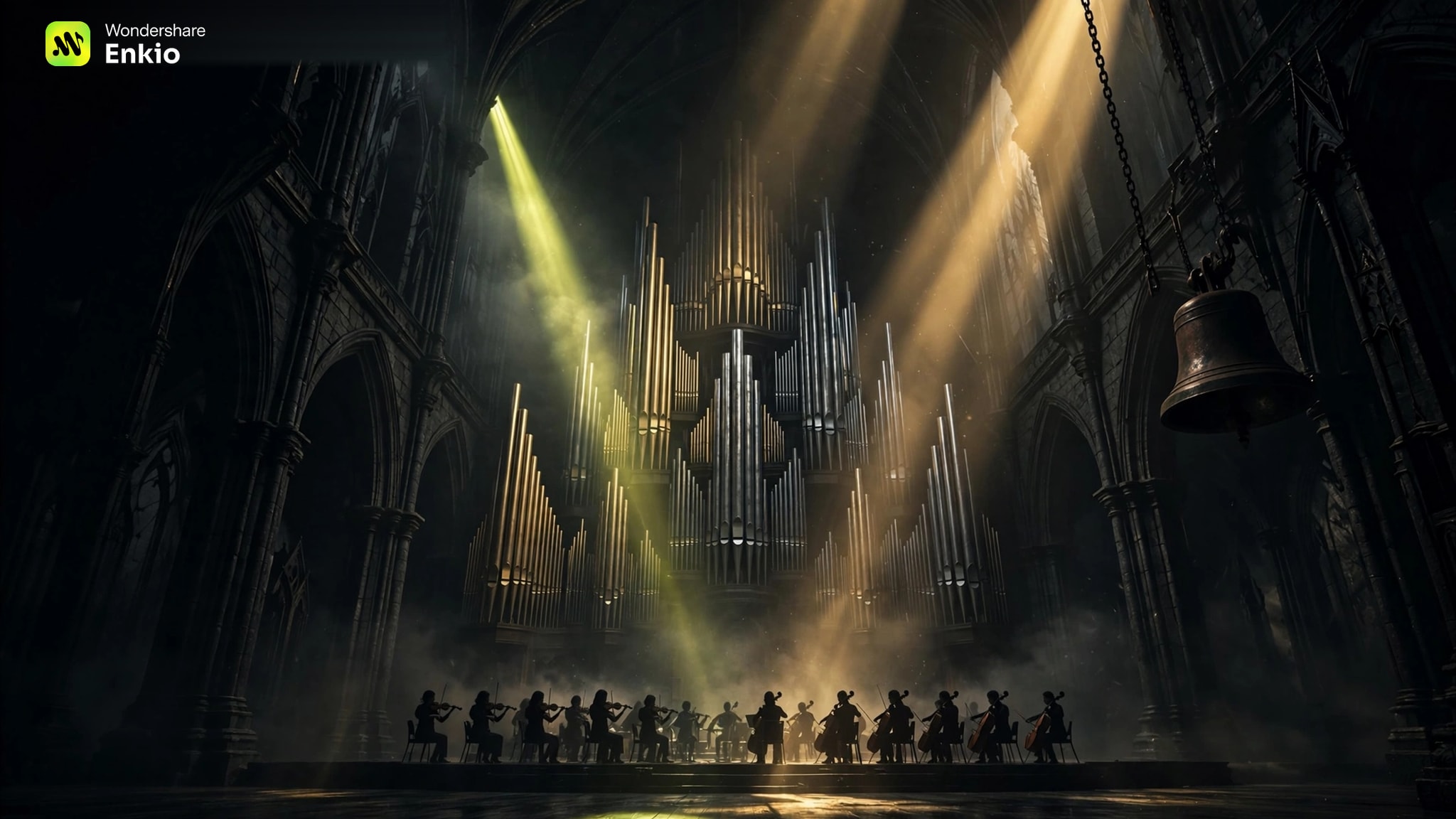
Some rooms want the haunted-concert-hall sound: the feeling behind halloween theme music, where one melody becomes the thing everyone remembers. Describe the orchestra, not the era — a solo violin over tremolo strings, a church organ announcing the theme, bells and low brass underneath. Choose instrumental, and set the arc in the description: quiet dread, a chase, a release.
Each famous piece survives because of one device — an accelerating dance, an organ opening, a fiddle tune at midnight — and each device is a sentence you can borrow for your own description. Our Classical Halloween Music guide turns four of them into recipes.
Turn Your Best Track Into a Halloween MV
A finished track already carries its video's first frame: the album cover attached when it was generated. The steps below are the condensed version — our Halloween Music Videos guide gives the full walkthrough, including prompt recipes for three Halloween looks.
Start from the cover — or a photo of your star
Open the AI Music Video Generator, upload your track, and give it a reference image: the album cover the song came with, or a photo of the person who should star in it. An optional prompt can describe the story or any special requests; leaving it blank works too. Then pick the MV mode — solo, duo, or Ultra — plus the resolution (720p or 1080p) and one of five aspect ratios, and confirm Create.
Put your best track on the screen.
Your song already has a cover. Turn it into a Halloween music video your guests will remember.
Approve the three-view, fix single clips
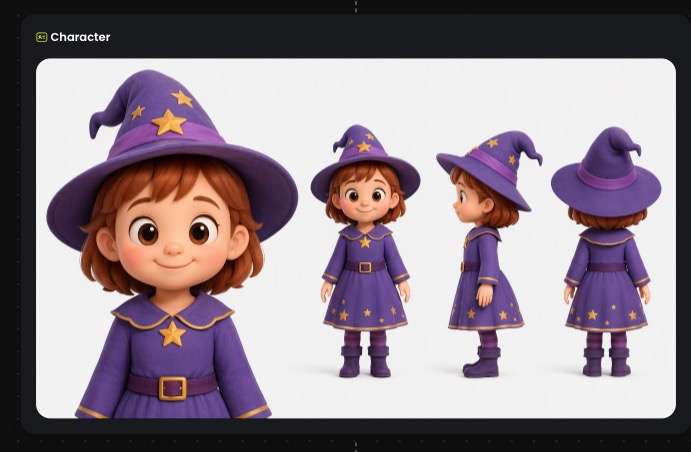
The workflow page lays the production out before anything renders: the blueprint, the timecode, the visual materials, and the main character's three-view — front, side, and back. Check the three-view first, because it keeps your star consistent across every clip. If one clip's scene is wrong, change that clip alone; the rest of the plan stays as approved. Confirm the three-view, and Enkio runs the full build automatically from there.
Preview the full video, then Save
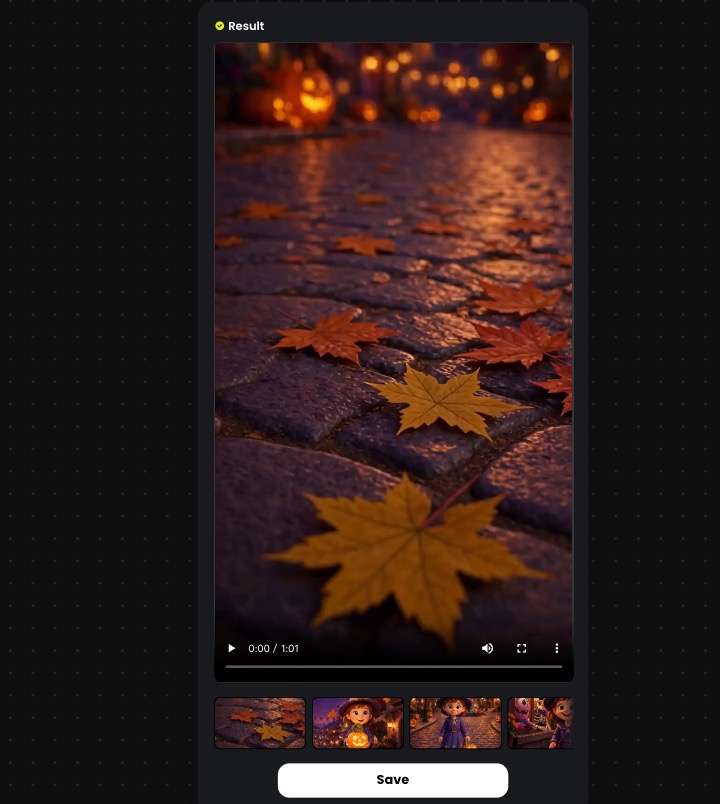
Give the finished video one full watch before it goes anywhere near a guest. If a scene still misses, fix that scene only and re-render the piece. Then hit Save to keep the video on your device, ready for the party screen or the family chat.
See what your Halloween set costs before you start.
Plans, credits, and export options are listed on the official pricing page.
Frequently asked questions
I need five different kinds of Halloween music for one party — do I have to generate them one by one?
Yes — each sound is its own generation, because each needs its own description and settings. In our experience the work repeats less than it sounds: the four steps stay identical, so after the party track, the bed, the ambience, the kid-safe song, and the orchestral piece are mostly new descriptions in a flow you already know. Work in party order — the track guests will sing to first, background beds last — and keep each keeper in Projects as you go.
Can I generate a Halloween track with no vocals for a shop or café?
Yes: choose the instrumental option and the track comes back with no vocals at all — the same recipe as the background beds above, tuned to your space. Playing generated music in a business is a usage question, though, not a generation one, so check what your plan covers before the doors open. For commercial usage terms, see Enkio's Terms of Use.
How many tracks can I make in one evening?
That depends on your plan rather than on the clock: generations draw on your plan's allowances, and plans differ. As of October 2026, the plans and what they include are listed on the official pricing page — check there before you plan a night of tracks around one account.
Can I put my generated Halloween songs into a playlist app?
In most cases, yes: download each keeper as an MP3 and import the files into your music app the way you would any local audio, then build the playlist there. Local-file import works differently from app to app, so if a file will not appear, the app's own help pages are the place to check.
What if a generated track comes out too scary for my guests?
Do not turn it down and hope — regenerate it. Scare level lives in the description, so soften the words that caused it: swap minor-key dread for a brighter arrangement, ask for a faster tempo, and name the sounds you want gone, like whispers or sudden hits. Preview the new version at party volume before it joins the list; the too-scary take can wait for an adults-only hour, or be deleted.
Conclusion
A borrowed playlist gives your guests the same Halloween everyone else is having. A night of halloween music that started as your descriptions — the chorus your friends can shout, the bed under the conversation, the scare timed for after dark — exists exactly once, fitted to the room it plays in.
Start with the sound your night needs most, run the four steps, and let the keepers accumulate.
If the playlist is ready but the room still needs something on its screen, Enkio can build the video from the track you already made — the cover starts it, you approve the character, and the cut assembles itself from there.