




AIMusic.so is a browser music workbench that creates songs from text or lyrics and bundles stem separation, vocal removal, lyric video, sound effects, cover images, extension, and lyric generation. It is most convincing on a paid plan for creators who use credits every month; the free tier is harder to trust because the plan card and the FAQ give different answers about rights, privacy, and file formats.
Know the next deliverable before generating.
When the finished song needs a full visual, Enkio continues from audio into a music video workflow.
How We Tested This Tool
What AIMusic.so Is
AIMusic.so is a credit-priced web studio for creating complete songs and running related audio tasks in one account. The primary input is a text prompt or lyrics. The surrounding tools include vocal removal and stem splitting, lyric video, sound effects, cover images, music extension, and lyric generation.
This makes it a workbench within the AI Music Generator category rather than a single-feature generator.
How to Use AIMusic.so
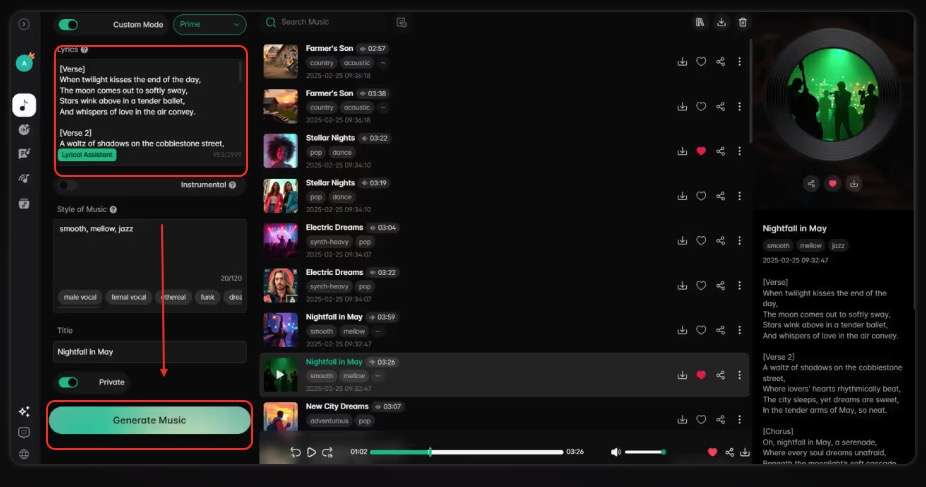
The public workflow follows a simple loop: write the brief, generate, decide whether the song is usable, then spend more credits only on the supporting actions the release requires.
-
Describe the genre, mood, subject, vocal direction, and intended use, or paste lyrics you have the right to use. Keep the first version focused enough to evaluate.
Done whenThe brief has one clear musical direction.
-
Run the generation, then listen for structure, vocal clarity, and whether the result follows the brief. The published table lists five credits per generated track.
Done whenYou can choose to keep, revise, or regenerate.
-
Use stem splitting, vocal removal, a cover image, sound effects, extension, or lyric video only when the deliverable needs it. Several actions reduce the same balance.
Done whenEvery paid action maps to a release requirement.
-
Export the format allowed by the plan, save a local copy, and retain the applicable licence information before relying on the file in a release.
Done whenThe asset and its usage record are stored outside the service.
The flow is familiar to users of prompt-based song tools. How to Use Suno AI Music Generator offers a useful comparison with a more song-centered interface.
What AIMusic.so Gets Right
AIMusic.so does three useful things before a buyer pays: it publishes action costs, shows the storage rules, and presents the tool bundle in one place. Those details make capacity planning more concrete.
The credit-consumption guide is readable
The official table lists song generation at five credits, vocal removal at five, a sound effect at one on Pro and Ultra, a cover image at two, and music extension at three. Lyrics are free, while lyric video is listed at zero credits on Pro and Ultra. That level of detail makes it possible to calculate a realistic workload.
The free entry points are explicit
As of October 2026, an account receives 15 credits per day, which the vendor equates to about three songs. A visitor without an account receives five trial credits that renew every 14 days. The page also states the daily refresh time as 00:00 UTC, reducing ambiguity about when the balance returns.
One account covers several post-song tasks
The generator and utilities share a workspace. A creator can make a track, split it, remove vocals, extend a section, build a cover image, or make a lyric video without establishing a separate account for each task. The Soundraw AI Music Generator Review provides a contrasting model built more around a music catalogue and licensing workflow.
Pricing and Credits
As of October 2026, the active annual view lists Free at $0, Pro at $7.99 per month with $95.88 billed yearly, and Ultra at $23.99 per month with $287.88 billed yearly. Check the official pricing page for current plans and for the separate monthly view.
| Plan | Listed price | Credits | Approximate songs | Key limits |
|---|---|---|---|---|
| Free | $0 | 15 per day | About 3 per day | 1 concurrent job, 7-day storage |
| Pro | $7.99 per month, billed yearly | 1,500 per month | About 300 per month | 4 concurrent jobs, unlimited storage |
| Ultra | $23.99 per month, billed yearly | 10,000 per month | About 2,000 per month | 10 concurrent jobs, unlimited storage |
The song counts assume every credit goes to generation. A user who generates a track and removes its vocals spends ten credits across the pair of actions. On Pro, that turns the headline 300 songs into 150 comparable song-plus-removal jobs. Cover images, extensions, and sound effects reduce the remaining capacity.
Unused paid credits reset at the end of each billing cycle and do not roll over. The plan therefore rewards consistent monthly output and penalizes quiet periods. Our Soundverse AI Music Generator Review applies a similar workload calculation to a different credit system.
Compare the whole release workflow.
Review current music and video benefits before choosing a plan.
Real Limitations
The most important limitations come from contradictions in the vendor's own pricing page. They affect rights, privacy, formats, and the value of unused credits.
The Free card conflicts with the FAQ on commercial rights
The Free card lists commercial usage rights and a PDF commercial licence certificate. The FAQ says all paid plans include commercial rights, annual plans receive the certificate, and free users do not receive commercial rights. These statements cannot all describe the same entitlement. Use the stricter FAQ and obtain written confirmation before commercial use.
For creators whose audio rights are already settled, the next gap may be visual rather than musical. But this won't be a problem is you have Enkio, whose workflow can take a song and image into 720p or 1080p video across five aspect ratios.
For this song-to-video use case, our desk-research rubric weights workflow fit 30%, output coverage 25%, pricing clarity 20%, documented limitations 15%, and rights clarity 10%. The score does not assess audio quality.
Our verdict
Useful when the finished track needs a complete visual.
Enkio covers the audio-to-video handoff and multiple aspect ratios, while disclosing its 1080p ceiling and plan-dependent benefits.
Pros
- Song-to-video workflow
- Five aspect ratios
- Failed jobs refunded
Turn a finished track and images into an AI music video.
AI Music Video GeneratorThe Free card also conflicts with the format table
The Free card lists MP3 and WAV downloads. The format section says MP3 download is limited to paid plans and WAV is limited to Ultra. A free user should therefore not assume either format is available simply because it appears on the card.
Free privacy language is inconsistent
The Free card lists private generations, while the FAQ says free generations are public and paid users can make work private. Treat free projects as public until the vendor resolves the contradiction.
Credits do not roll over
Unused paid credits disappear at the billing reset. High theoretical song counts are less valuable when a creator works in occasional campaigns instead of every month.
Formal certificate access depends on annual billing
The FAQ says annual subscribers may receive the downloadable PDF licence certificate. Month-to-month customers should confirm what proof accompanies a commercially used song before release.
How AIMusic.so Compares With Lami and Enkio
AIMusic.so and Lami still share Free, Pro, and Ultra tiers, but their public rules are no longer identical. The final column uses the same decision fields and discloses the publisher's own boundaries.
| Decision point | AIMusic.so | Lami | Enkio |
|---|---|---|---|
| Paid entry | Pro at $7.99 per month, $95.88 billed yearly | Pro at $7.99 per month on annual view | $19.99 per month |
| Song cost | 5 credits | 5 credits | Current cost is listed on the pricing page |
| Paid storage | Unlimited | Unlimited | Unlimited, and tasks retained 7 or 30 days on the Enkio Cloud depending on plan |
| Visual output | Lyric video on paid plans | Lyric video | Full music video at 720p or 1080p across five aspect ratios |
| Main constraint | Conflicting Free rights and format claims | Conflicting Free rights claims | Metered credits and 1080p ceiling |
The last column still has limits: output stops at 1080p, benefits depend on plan, and commercial terms require reviewing the Terms of Use. The comparison describes fit rather than declaring a universal winner. The Boomy AI Music Generator Review offers another reference for creators weighing fast song generation against release controls.
Who AIMusic.so Is For
AIMusic.so fits frequent creators who will use the monthly allowance, want several audio utilities in one browser account, and are willing to confirm the licence terms that apply to their plan. The published action costs make it especially suitable for users who plan capacity in advance.
It is a weaker fit for occasional release cycles, confidential free-tier drafts, or anyone who needs the Free card to serve as reliable evidence of rights and downloads. The contradictions are not minor wording differences; they change whether a user may publish, keep a draft private, or export a format.
Before paying, build one sample month on paper. Count song generations, vocal removals, extensions, covers, sound effects, and lyric videos separately. Compare the result with the plan balance, then assume any remainder disappears. Save the chosen entitlement page and written support answers with the exported asset.
Run a second preflight for the release itself. Identify the exact download format you need, whether the project must remain private, who will publish it, and what proof of commercial permission the client or platform expects. Then ask support to resolve any point where the Free card, FAQ, and format table disagree. We would not treat a screenshot of the generous plan card as sufficient documentation when another official section states a narrower rule. This check is especially important for client work, scheduled campaigns, and projects whose source files cannot be made public.
Readers who still need to compare the category can use Best AI Music Generators as a broader decision map.
From an AIMusic.so Track to a Music Video
AIMusic.so's visual tool is a lyric video, which is useful when timed words are the central visual. It does not replace a full character-led or scene-led music video for a release that needs more than typography.
When the track is ready, Enkio can start from the audio and an image, with a template or optional prompt, then build the visual in Solo or Two-Person MV mode. Platform policies on AI-generated content differ, so check the current rules for the channel where the result will be published.
Frequently asked questions
When do free AIMusic.so credits refresh?
The official FAQ says free account credits refresh daily at 00:00 UTC. The no-account five-credit trial renews every 14 days.
Can I cancel through the account settings?
The FAQ says subscribers can cancel through user settings. Customers who paid with PayPal are directed to email support when changing plans.
How do I contact AIMusic.so support?
The site lists support@aimusic.so. Keep the response when asking about commercial usage, export formats, privacy, or licence certificates.
Which model is available on each plan?
The FAQ says V6 mini is available on every plan, V6 on paid plans, and V6 Wild with Ultra. The Pro card also mentions V6 Wild, so confirm current access in the account before choosing a tier for that label alone.
Is AIMusic.so the same product as Lami?
The services share plan names and paid prices, but the current pages differ on daily credits, model labels, action costs, and export rules. The evidence supports noting overlap, not claiming common ownership or identical products.
Conclusion
This AIMusic.so review finds a transparent credit system wrapped in an inconsistent set of entitlement claims. The product publishes enough detail to estimate song and post-production volume, and its bundle suits creators who work frequently. However, free rights, privacy, downloads, and certificate access should be read from the stricter FAQ and format tables, not from the more generous Free card.
Choose a paid plan only after mapping the monthly workload and saving the applicable rights documentation. If the song is complete and the remaining deliverable is a full visual rather than a lyric video, Enkio handles that next step from the finished audio.