





LoudMe is a text-to-song AI music generator that also produces sound effects from a written prompt, and it runs as a web tool at loudme.ai. Our review covers what the tool actually generates, how its credit system meters a song against a sound effect, and where it stops at audio rather than video.
The short answer: the LoudMe AI music generator turns a text prompt into a sung, customizable track and separate sound effects, but it does not generate a music video, so a finished song still needs a separate visual step before it can be published as a clip.
What the LoudMe AI Music Generator Is
You meet the LoudMe AI music generator as a single prompt box rather than a studio with separate modules. You describe a song in plain language, and the tool returns a complete track with adjustable length, vocals, and lyrics, plus — on the same account — sound effects built from a second kind of prompt. The product positions itself in the text-to-song corner of the market, next to prompt-driven song tools rather than next to video makers.
The category context helps place it. The AI Music Generator space now spans prompt-to-song tools, conversational agents, and video-linked studios, and LoudMe sits in the first group with an emphasis on speed and a low entry bar. For a grounded comparison with the best-known song tool, the Suno Music Generator Review is the natural companion read, because both turn a brief into a sung track yet start from different input models and feature sets.
LoudMe states that it generates songs from a text description, then lets you customize length, vocal style, and lyrics, and that the same engine can produce sound effects from a descriptive sentence. The vendor also states that a V2.0 model can return instrumental or vocal-only tracks and can accept an uploaded audio file as a reference. The official site frames the tool as built for people with little or no musical background.
How It Works in Practice
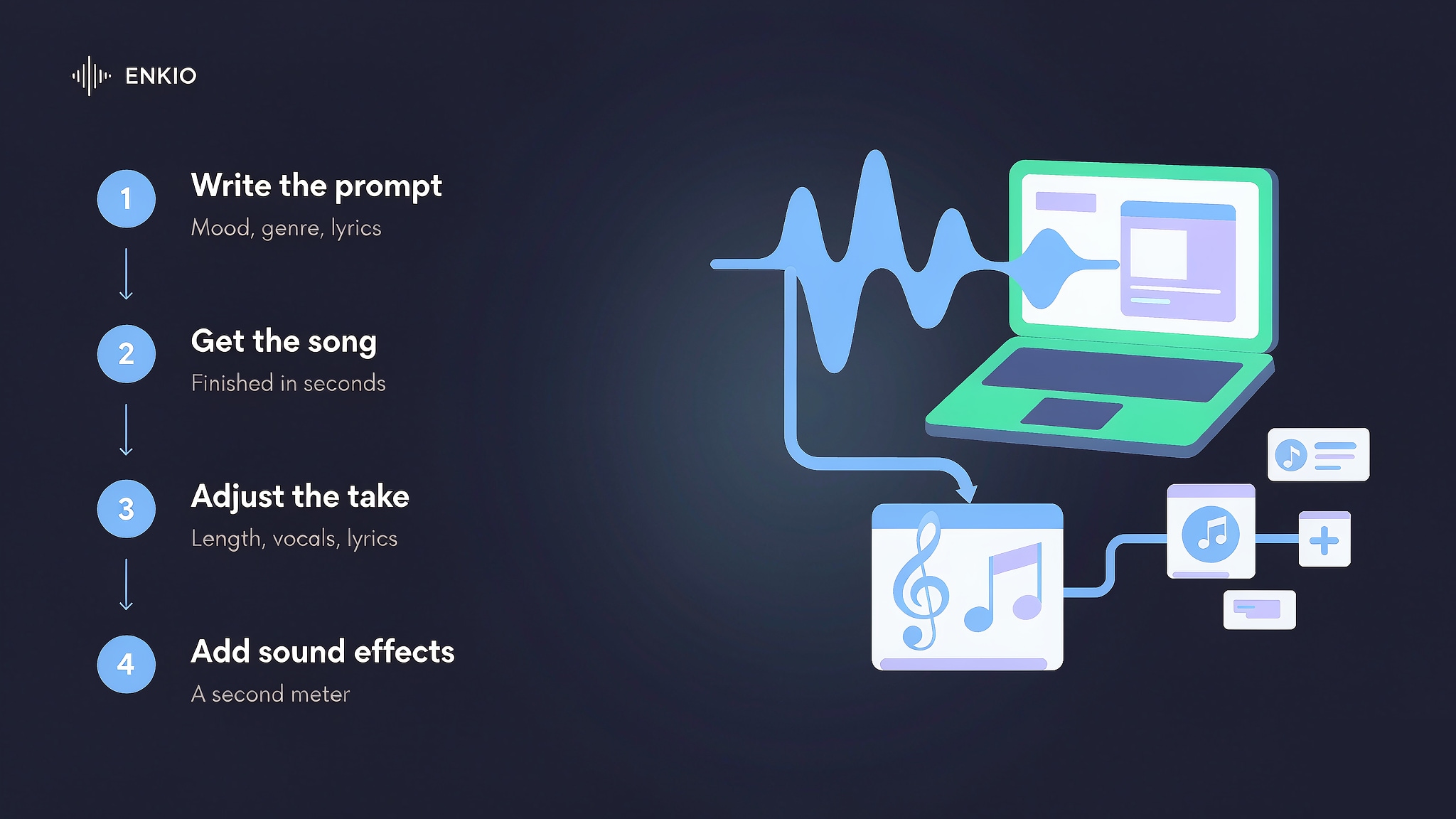
The workflow is short and built around one text field, and most of the effort sits in writing the brief rather than in editing the audio afterwards.
Describe the song in a text prompt
Generation starts from natural-language text instead of a structured form. You write the mood, genre, and any lyrical idea you want, and the tool treats that description as the full brief. The vendor states that a single prompt is enough to return a complete song, which is the part that separates LoudMe from tools that expect a finished lyric or a reference clip up front.
Generate and wait a few seconds
Once the prompt is set, the engine returns a track in a short span of time according to the vendor's description. You do not pick instruments or arrange sections yourself; the output arrives as a finished song that you can play back and download. The free and paid tiers differ in queue priority and concurrency, but the basic loop is identical across them.
Refine length, vocals, and lyrics
The post-generation step covers the customization the prompt set up. The official page lists controls for song length, vocal style, and lyric content, and the V2.0 notes mention instrumental or vocal-only variants plus reference-audio upload. Those controls let a creator move a first draft toward a usable track without leaving the project, though the depth of music editing is narrower than in tools built around a piano-roll or a stem view.
Generate sound effects from the same account
A separate prompt type turns a sentence into a sound effect rather than a song. The vendor states this covers a wide range of everyday and environmental sounds, and it prices sound effects on their own credit meter. That second generator is the reason LoudMe reads as a small audio toolkit rather than a song-only tool, and it is the feature most song-only competitors do not include.
What the LoudMe AI Music Generator Gets Right
Three strengths held up against the official listings we read.
A non-musician can produce a full song
LoudMe assumes you want to describe a track rather than compose one. The prompt-first shape and the stated customization of length, vocals, and lyrics mean a creator with no instrument or DAW experience can still return a finished, sung song. For someone who thinks in mood and scene, that low entry bar is the product's clearest advantage over tools that expect music theory up front.
The genre and style range is broad
The vendor states the tool covers a wide span of genres, naming classical, jazz, synth, pop, rock, and metal among others, and it frames the output as matching the described style. The breadth is real for casual and content-use cases, and it is the reason the tool suits creators who want one track in one style without managing a library of models. The Mureka AI Music Generator Review shows what a model-switching competitor looks like.
Sound-effect generation is built into the same account
Beyond the song, LoudMe lists a text-to-sound-effect generator that returns environment, machine, and creature sounds from a sentence. That bundle is broader than most song-only generators, and it is the reason LoudMe reads as a small audio toolkit. The breadth is useful for video editors and podcasters who want both a bed and a one-off sound from one login, even though the two outputs are billed on different meters.
Pricing and Credits
As of September 2026, the vendor's pricing page states the credit structure below, and the vendor may adjust it, so check the official pricing page for current rates before you subscribe. The figures below are the vendor's stated values at the time of writing, and we cite them as the vendor's listing rather than as our own measurement.
| Plan | Monthly credits | Stated capacity | Notable limits |
|---|---|---|---|
| Standard | 500 per month | About 100 songs or 250 sound effects | Priority queue, up to 6 concurrent jobs |
| Pro | 2,000 per month | About 400 songs or 1,000 sound effects | Priority queue, up to 6 concurrent jobs |
| Ultimate | 20,000 per month | About 4,000 songs or 10,000 sound effects | Dedicated queue, up to 20 concurrent jobs |
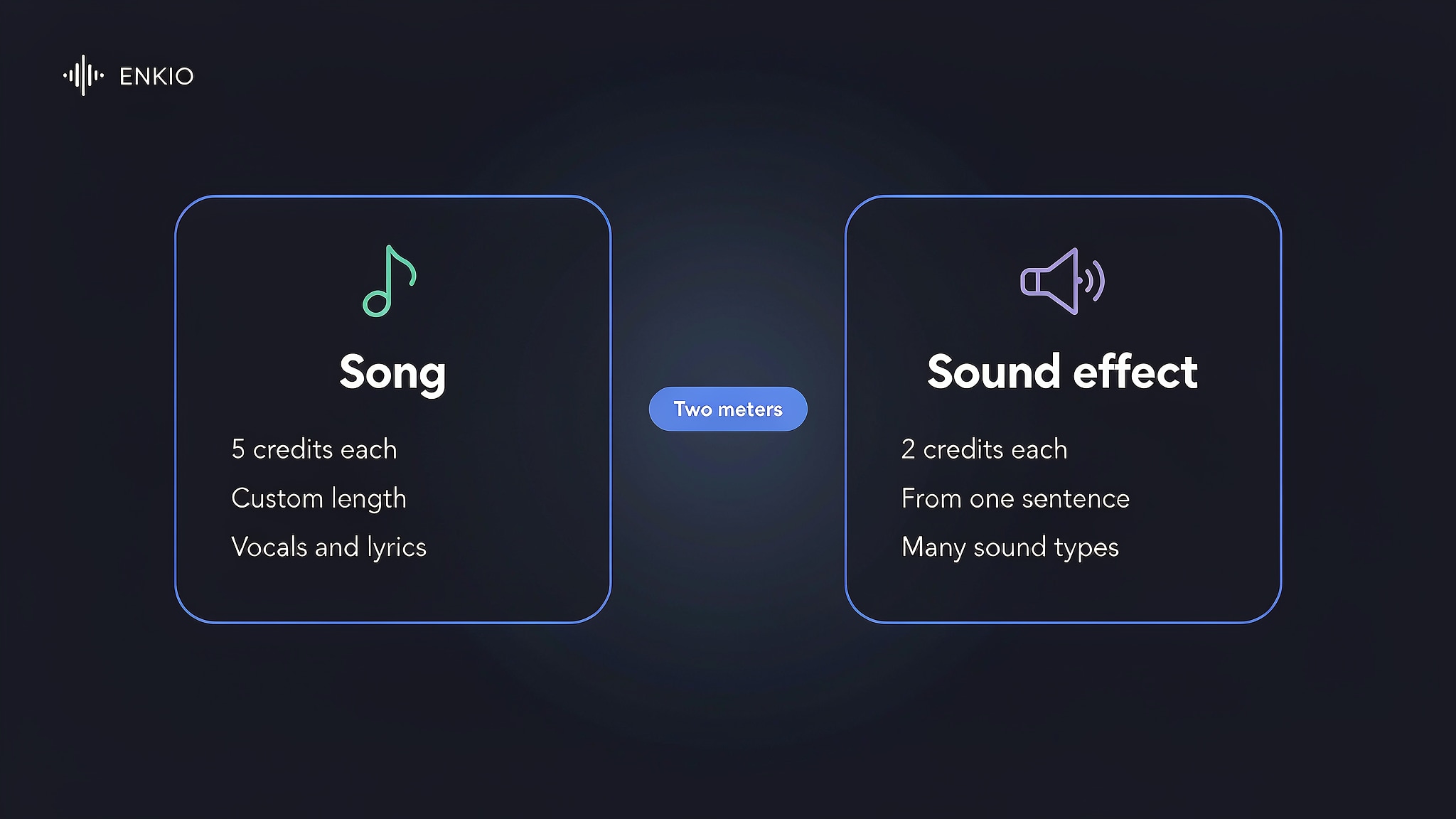
The detail that decides value is the per-unit math, not the headline. As of September 2026, the vendor's pricing page states that each song costs 5 credits and each sound effect costs 2 credits, so the tiers above are really bundles of those units. The same page lists credit top-ups as an extra purchase on top of the paid plan, which means a heavy month can cost more than the listed tier implies.
The dollar side is harder to state with confidence. The credit tiers and feature lists above come from the vendor's own pricing page, but the page does not publish a single consistent dollar price in the listings we read. Third-party aggregators that track the product show wide and conflicting ranges — one lists Standard near $14.99 and another near $7.99, Pro between $19.99 and $39.99, and Ultimate between $169.99 and $349.99 — and at least one source states that no free plan exists while the vendor and other directories list a free tier of about 20 credits per month. Because the sources disagree, we could not verify a single consistent dollar price on the vendor page, so check the official pricing page for current rates before you subscribe.
Compare what a plan includes.
Enkio plans include AI music and music video generation, with credit costs listed on the pricing page.
Real Limitations of LoudMe
The limits below are structural, and the first one is the reason most publishing decisions turn on this tool rather than its sound.
LoudMe does not generate a music video
The tool's output stops at audio. LoudMe returns a sung or instrumental track and, separately, sound effects, but it does not produce a music video or any timed visual from the song. For a creator who already has a finished track and wants a video to ship, that gap is the tool's defining limit, because the song and the visual come from two different products.
That gap matters once you hold a finished song and want the visual half. If the piece you are missing is the video, Enkio's AI Music Video Generator takes a finished track plus a visual direction and returns 720p and 1080p output across five aspect ratios, on credit-based plans with the current credit costs on its pricing page.
Credits meter songs and sound effects separately, and top-ups cost extra
As of September 2026, the vendor's pricing page states that each song costs 5 credits and each sound effect costs 2 credits. The monthly tiers bundle those credits — Standard at 500, Pro at 2,000, Ultimate at 20,000 — and the vendor lists credit top-ups as an extra purchase on top of the paid plan. A creator who generates both songs and sound effects from one account therefore watches two different meters, and the top-up step adds cost beyond the headline tier rather than folding into it.
Commercial use depends on keeping a paid plan active
The vendor states that songs made during an active paid plan carry a commercial use license, while free-plan songs are limited to non-commercial use. We report that as the vendor's stated terms and have not verified them directly, so read the vendor's terms before any commercial step. The point for planning is that the licence is tied to the paid plan rather than granted to the file outright, which matters if you intend to monetize the track on a platform.
Free access is limited and reported inconsistently
The vendor's site describes the AI song maker as free to use, and several directories list a free tier of about 20 credits per month. At least one pricing aggregator states that no free plan exists and that paid plans start around $7.99 per month. Because the sources disagree, treat the free tier as unconfirmed and check the official pricing page before relying on it for ongoing work.
How It Compares With Suno and Enkio
Two reference points help here: Suno, the well-known prompt-driven song generator, and Enkio, which publishes this review — read the last column as a statement of what ships today rather than as a verdict. The comparison below is a snapshot as of September 2026, and each vendor adjusts its plans, so verify specifics with the platform before you choose.
| Dimension | LoudMe | Suno | Enkio |
|---|---|---|---|
| Starting point | Text prompt that returns a song | Text prompt, often with optional lyrics | Upload a song and image, or pick an official track |
| Music output | Sung songs with custom length, vocals, and lyrics | Its own generation pipeline | Generates music with vocals and custom lyrics |
| Sound effects | Built-in text-to-sound-effect generator | Not a core feature | Not a music-only feature |
| Music video | Not offered | Not a core feature | Core, in Solo MV Mode or Two-Person MV Mode |
| Video output specs | No video output | No video output | 720p and 1080p across five aspect ratios |
| Credit and billing | 5 credits per song, 2 per sound effect; tiers of 500 / 2,000 / 20,000 per month | Pricing varies; check the vendor's site | $19.99 per month for 3,000 credits as of September 2026; failed generations are not deducted |
| Best fit | Text-driven song and sound effects for non-musicians | Prompt-driven songwriting at a desk | One plan for the track and its video |
LoudMe suits the job where a song and a few sound effects come from one prompt, and Suno suits the desk-bound writing session — the How to Use Suno AI Music Generator guide shows that path. The third case puts both halves of the release with one owner, so the song and the video stay inside a single plan; if the vocal itself still needs work before any video enters the picture, the Udio AI Music Generator Review covers that route.
Enkio's own column has limits too, and they sit next to the comparison rather than below it. The video output tops out at 1080p, and plan features such as concurrent tasks and task retention differ by tier, with tasks saved for 7 or 30 days and 2 or 4 concurrent tasks depending on the plan. The workflow still requires your own music and image before a video can start, and credits refresh monthly rather than carrying over. Because plan features differ by tier, check the pricing page before treating any row as settled.
Who the LoudMe AI Music Generator Is For Right Now
Our comparison splits by job.
LoudMe suits creators who want a sung track and a few sound effects from one prompt without learning an instrument or a DAW, hobbyists who value a broad genre range and a low entry bar, and video editors or podcasters who want a quick bed and a one-off sound from one login. The prompt-first loop and the built-in sound-effect generator make it a low-friction starting point for scene-led and casual work.
It is a weaker fit for anyone who needs a finished music video from the same tool, because LoudMe does not generate video at all. It is also a poor match for buyers who want a licence granted to the file outright rather than tied to an active paid plan, and for creators who generate both songs and sound effects in volume and would rather not manage two meters plus top-ups. If your priority is a sung track with the occasional sound effect, this is a reasonable option in its category.
From a LoudMe Track to Something You Can Publish
A generated track is usually the start of a piece of work rather than the end of one. A song written for a scene becomes a video, and a sound effect written for a clip becomes a release asset.
If you already hold a track and want the visual half, Enkio takes the finished audio plus a visual direction and returns a music video, with 720p and 1080p output across five aspect ratios including 9:16 and 16:9. LoudMe songs pair cleanly with a generated video, because the mood already matches the picture: shape the sound first, then give the finished audio a visual. For commercial usage terms, see Enkio's Terms of Use.
One reminder applies whichever route you take. Platform policies on AI-generated content differ, and several major platforms expect disclosure when music or video is machine-generated. Check the platform's current guidelines before publishing, particularly if monetisation is the goal.
Make more from your track.
Let Enkio create a complete AI music video from your song with optional prompts up to 2000 characters.
Frequently asked questions
These are the questions we see most often about the LoudMe AI music generator.
Is the LoudMe AI music generator free?
As of September 2026, the vendor's site describes the AI song maker as free to use, and several directories list a free tier of about 20 credits per month. At least one pricing aggregator states that no free plan exists. Because the sources disagree, treat the free tier as unconfirmed and check the official pricing page for the current free limits before relying on it.
How much does LoudMe cost?
As of September 2026, the vendor's pricing page states the credit tiers rather than a single dollar price in the listings we read: Standard at 500 credits per month, Pro at 2,000, and Ultimate at 20,000, with each song costing 5 credits and each sound effect costing 2 credits. Third-party aggregators list wide and conflicting dollar ranges, so we could not verify a consistent price; check the official pricing page for current rates.
Does LoudMe generate music videos?
No. LoudMe returns sung or instrumental songs and, separately, sound effects, but it does not produce a music video or any timed visual from a song. A creator who wants a video from a LoudMe track needs a separate video tool for that step. The audio and the visual therefore come from two different products.
Can I use LoudMe music commercially?
The vendor states that songs made during an active paid plan carry a commercial use license, while free-plan songs are limited to non-commercial use. We report that as the vendor's stated terms and have not verified them directly, so read the vendor's terms before any commercial step. The licence is tied to the paid plan rather than granted to the file outright.
How many credits does a song or sound effect cost?
As of September 2026, the vendor's pricing page states that each song costs 5 credits and each sound effect costs 2 credits. The monthly tiers bundle those units — Standard 500, Pro 2,000, Ultimate 20,000 — and the vendor lists credit top-ups as an extra purchase on top of the paid plan. Plan totals and per-item costs are presented together on the pricing page.
Who makes LoudMe?
LoudMe runs as a web tool at loudme.ai, and several third-party directories list it as an independent AI music and sound-effect generator. We could not verify a parent company or founding team beyond the loudme.ai operator, and we have not confirmed a release date, so treat the ownership details as unverified and check the vendor's own about page for the current corporate information.
Is there an alternative if I only need the video half?
If your song is already finished and the missing piece is the visual, you do not have to adopt a full music platform. In our Alternatives to Suno AI Music Generator guide we compare several options side by side. If your priority is turning an existing song into a video without learning a new timeline, a dedicated video tool handles the audio-to-video step from the track you already have.
Conclusion
LoudMe takes a clear position by turning a text prompt into a sung, customizable track and adding a sound-effect generator in the same account. The strengths are real: a low-friction prompt-first loop, a broad genre range, and a built-in sound-effect tool that most song-only competitors leave out.
The trade-offs are equally clear: the tool stops at audio and does not generate a music video, its credits meter songs and sound effects on separate scales with paid top-ups, commercial use is tied to keeping a paid plan active, and the free tier is reported inconsistently across sources. If the track is finished and the visual is the next item on your list, Enkio takes that step from the audio you already have, without a timeline to learn.