



Our six-tool test produced playable gospel tracks from two services. Enkio completed a downloadable song with a direct music-video handoff, while Vocuno returned two full-song variations without requiring login. The other four attempts either failed or placed account creation before the output.
Create a gospel song, then carry it into a music video.
Describe the lead vocal, choir response, instruments, tempo, and emotional build in one focused Enkio brief.
That distinction matters when searching for an AI gospel music generator free of access friction. A public generator page is not a verified anonymous flow, and a choir workstation is not a prompt-to-complete-song tool. We tested workflows and deliverables, not objective audio quality.
What Is the Best AI Gospel Music Generator?
For a complete song that can continue into a video, Enkio is our best-fit pick. Our controlled brief produced a 3:20 MP3 and the completed project exposed both Download and Create Music Video actions. Vocuno is the better choice when the immediate goal is to try two gospel variations without signing in; its anonymous run produced two MP3s at 4:00 and 3:51.
Those are conditional recommendations. Separate soprano, alto, tenor, and bass parts require an editable vocal workstation. Our Best AI Music Generators guide covers the wider market; gospel adds two questions: can the brief express a lead-and-choir relationship, and can the song become a publishable visual?
How We Tested These Tools
Recently, we also tested Best Free AI Baby Dance Video Generator and analyzed Dream Relic Artist style and discovered a method to create as Dream Relic.
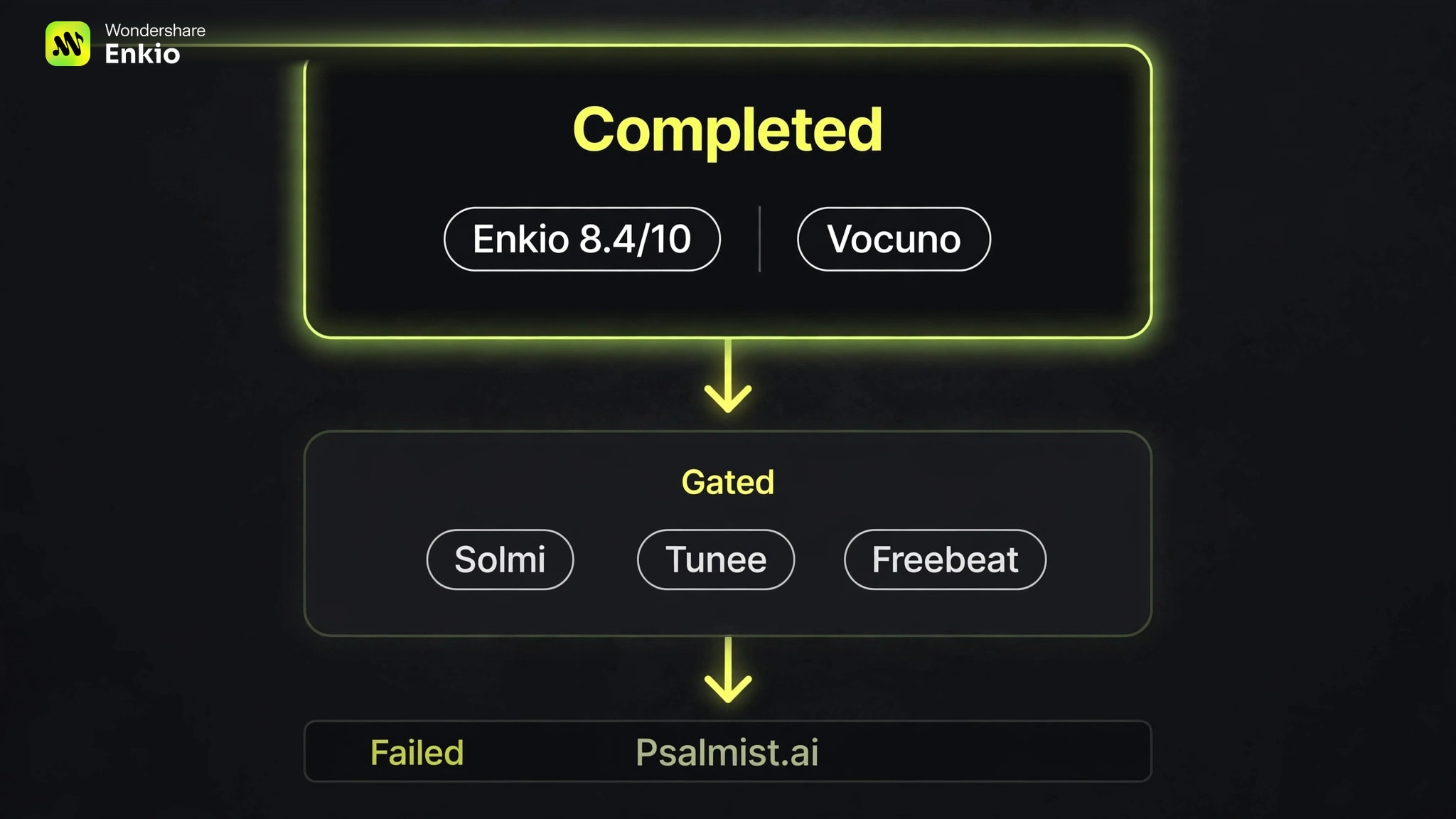
AI Gospel Music Generator Test Results at a Glance
This review is published by Enkio, and the same qualification rule was applied to every tested service. Every service received this brief: “Contemporary gospel praise song, 92 BPM, warm Hammond organ, live drums, soulful lead vocal, four-part choir call-and-response, uplifting chorus about finding hope after a hard week, gradual build from intimate verse to full choir finale.” It tests tempo, instrumentation, vocal architecture, theme, and arrangement without requesting the imitation of a living artist.
The workflow score uses six weights: complete-song output 20%, brief controls 20%, choir workflow 15%, deliverable control 15%, video continuity 20%, and access friction 10%. Observed times are upper bounds because results were ready by the next check.
| Tool | Test outcome | Output | Login before output | Gospel or choir route | Video handoff |
|---|---|---|---|---|---|
| EnkioSong-to-video pick | Completed | 1 × 3:20 MP3 | Signed-in test | Prompt plus vocal controls | Direct project action |
| Vocuno | Completed | 2 × 3:51–4:00 MP3 | No | Dedicated gospel page | Not verified |
| Psalmist.ai | Failed | None | No | Gospel style | None |
| Solmi | Gated | None | Yes | Dedicated gospel page | Official claim only |
| Tunee | Gated | None | Yes | Dedicated gospel page | Not tested |
| Freebeat | Gated | None | Yes | Instrumental or own lyrics | Not tested |
This table measures completion and workflow fit, not faithfulness or audio fidelity. The four unsuccessful or gated attempts remain because failure and pre-output login matter to free-tool searchers.
1. Enkio — Best for a Gospel Song-to-Video Workflow
The controlled AI Music Generator run used Simple Mode, a male vocal, automatic style, and the title “Hope After Friday.” As of November 2026, this test consumed 30 credits; check current plans and rates before generating. It produced one 3:20 stereo MP3 at 256 kbps and 44.1 kHz, ready by the next verified check at 10 minutes 54 seconds.
Its main advantage appeared after completion. The project card kept the audio, cover image, Download action, and Create Music Video action together. The finished song can move into a visual project without a separate upload-and-organize process.
There are real limits. Simple Mode showed no dedicated Gospel preset, so the choir architecture depended on the written prompt. Generation used metered credits, and this run did not render a full music video after the song. The 8.4/10 verdict is therefore a workflow score: 18/20 for complete-song output, 16/20 for brief controls, 10/15 for the prompt-led choir route, 13/15 for deliverable control, 20/20 for the visible video handoff, and 7/10 for access friction. Our Enkio Review covers the broader product boundaries.
Our verdict
Best fit when a gospel song and its music video belong in one project path.
The controlled run produced a downloadable full song and exposed a direct Create Music Video action. The score reflects observable workflow fit, not a blind judgment of audio quality.
Pros
- Complete 3:20 song
- Direct MV handoff
- Downloadable MP3 project
Create the gospel track first, then continue from the completed project into its visual.
AI Music Video Generator2. Vocuno — Best for No-Login Gospel Variations
Vocuno accepted the same brief anonymously and returned two tracks titled “New Day Dawning.” The interface showed durations of 4:00 and 3:51; the saved stereo MP3s measured 320 kbps at 48 kHz. Both were ready by the next verified check at 8 minutes 8 seconds, again an upper-bound observation rather than an exact completion time.
Two variations let a creator compare structure or pacing before registering. That makes Vocuno the strongest no-login result in this test, not an audio-quality winner.
The trade-off is retention. The anonymous page warned that unsigned results disappear after seven days, and sign-in was required to keep work in a library. We also did not verify a direct handoff from the finished song into a music-video project. Choose this route for quick variation testing; download promptly and plan the visual stage separately.
Which Tools We Did Not Rank—and Why
Psalmist.ai was the only unsuccessful service that progressed visibly toward a worship-specific result. We selected Gospel, submitted the controlled brief, and saw a bridge-writing state with a lead-call and choir-response lyric direction. The run ended in a network error and produced no file, so it did not qualify for a ranking.
Solmi accepted the prompt and showed a five-credit cost, but Generate opened a login modal before output. Tunee accepted the brief before presenting a sign-up and free-credit prompt. Our Tunee AI Music Generator Review covers the broader product rather than treating this gated attempt as an audio test.
Freebeat's Gospel page separated instrumental Prompt mode from an Own Lyrics vocal route. Generate opened a registration modal and no output was created. The Freebeat AI Music Video Generator Review gives more context. All three remain unranked because the public page did not produce playable anonymous audio.
AI Gospel Choir Generator: Full Song vs. Editable Choir
“AI gospel choir generator” covers two jobs. A full-song generator returns lyrics, lead vocal, a choir impression, instrumentation, and arrangement in one mix. It is faster for a demo or complete song, but the choir may remain blended rather than separately editable.
An editable choir workstation begins with MIDI and lyrics. ACE Studio's official workflow describes multiple AI singers, Unison Mode, separate harmony tracks, editable pitch, timing, and phonemes, plus stem export. It better fits independent soprano, alto, tenor, and bass control, but requires more arranging and account setup.
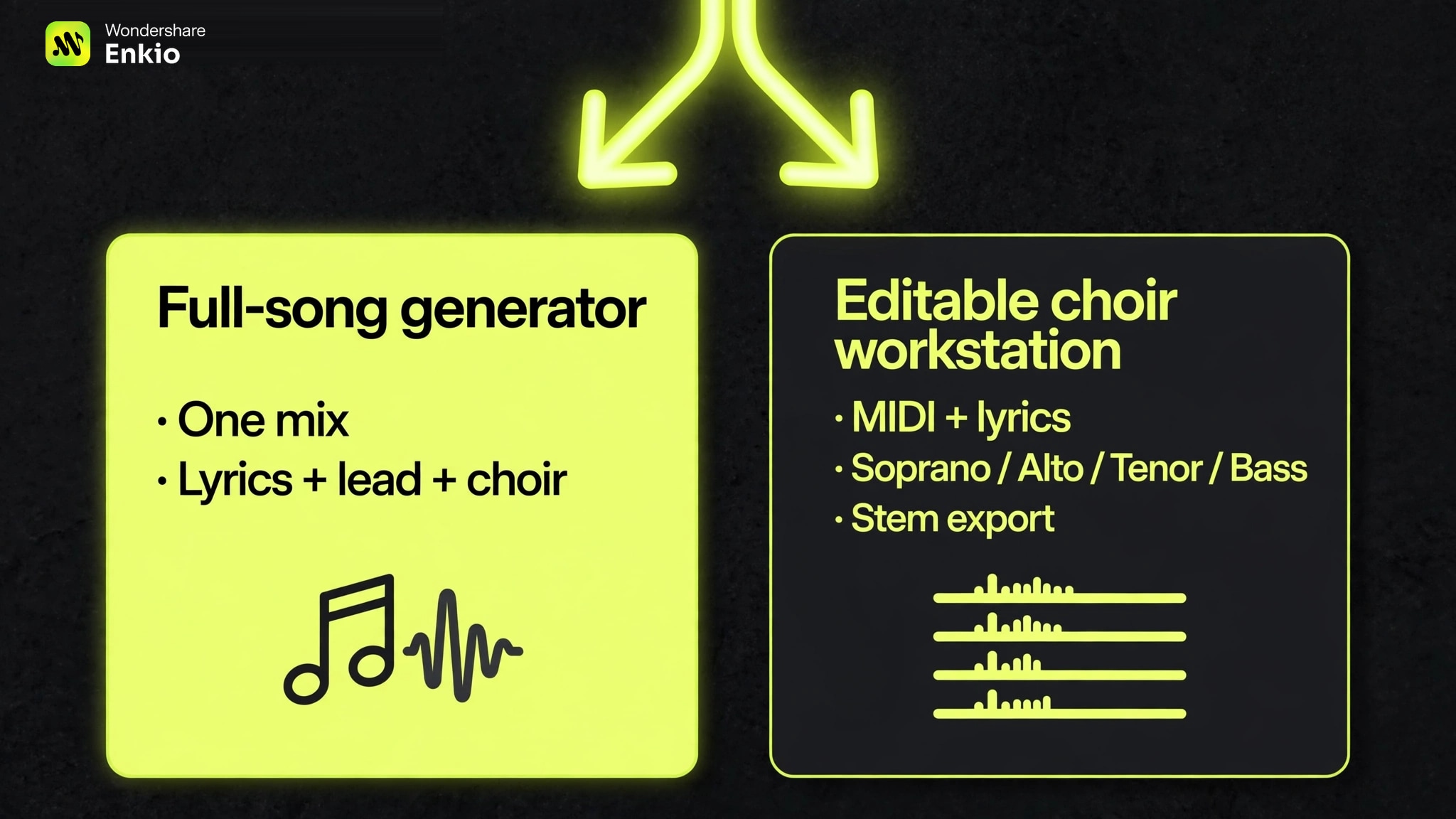
Choose by deliverable. For a complete song, describe the call-and-response explicitly. To rewrite an alto line or export voices separately, use a vocal workstation. Our Alternatives to Suno AI Music Generator guide covers more full-song options, not manual choir arranging.
How to Use Enkio to Create Gospel Music and a Music Video
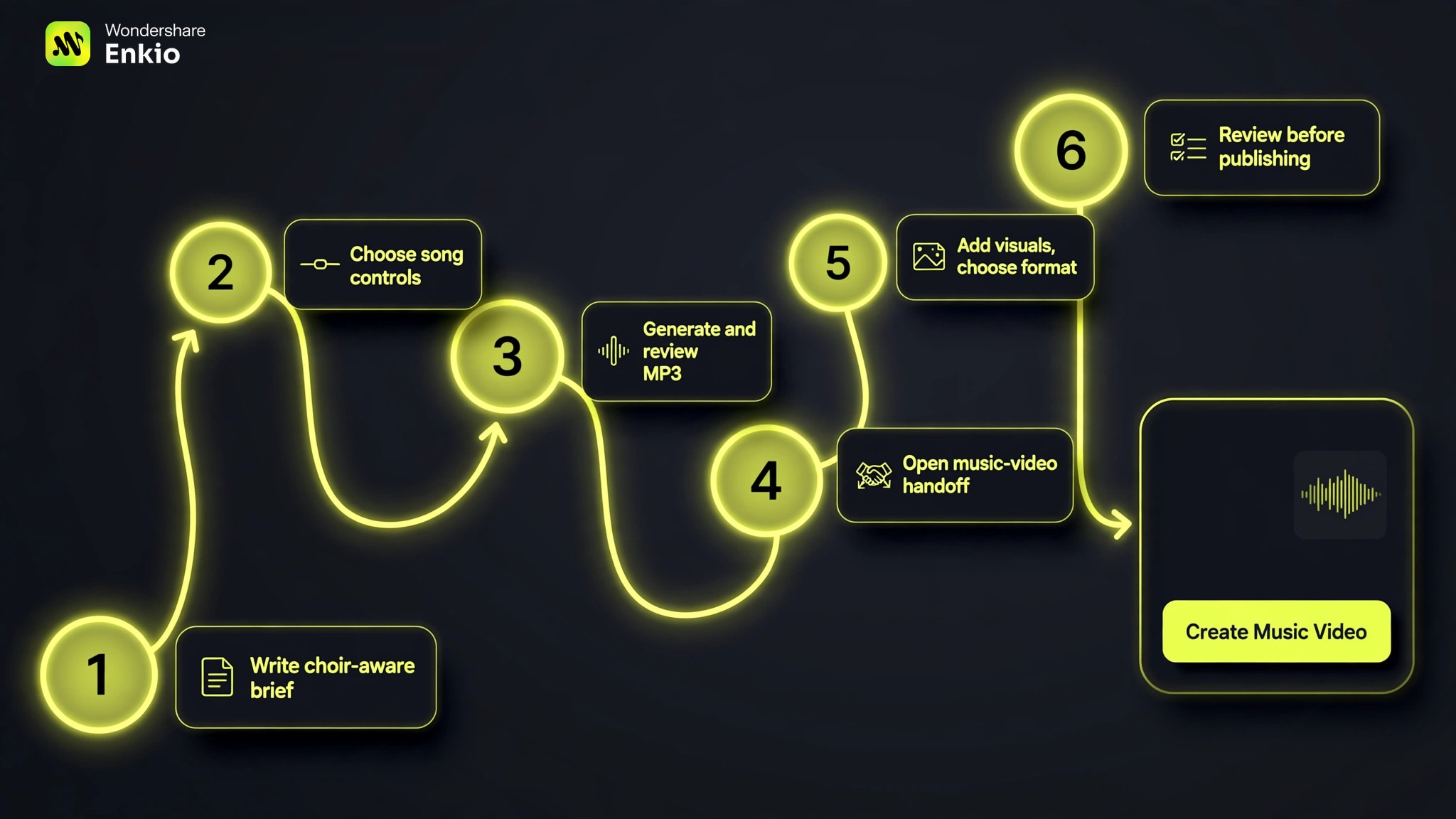
The workflow below separates what we verified from what remains a next-step action. The controlled run verified song generation, download, and the post-song Create Music Video button. It did not complete a full MV render in this test.
-
Define the theme, tempo, instruments, lead vocal, choir relationship, and intensity arc. Use musical traits rather than a living artist's voice or exact style.
Done whenThe brief names the lead, choir response, and arrangement build.
-
Set vocal or instrumental mode, title, and any visible style controls. For a full gospel song, keep vocals enabled and make the choir direction explicit in the prompt.
Done whenThe settings match a complete vocal song rather than an instrumental bed.
-
Submit the brief and listen through the full result. Check the chorus, call-and-response, instrumentation, and emotional arc before downloading.
Done whenA final track has been selected and saved.
-
From the completed project, use Create Music Video. This direct action was visible in our test; subsequent generation uses its own project settings and credits.
Done whenThe finished gospel track is attached to the visual workflow.
-
Use authorized visual references and choose the destination ratio. A 16:9 frame suits standard YouTube playback, while 9:16 suits vertical feeds.
Done whenThe references, format, and destination agree.
-
Check character consistency, scene changes, lyric-sensitive moments, and the final export with sound. Revise bounded weak shots instead of changing the whole direction at once.
Done whenThe saved video has passed a full visual and audio review.
Open the AI Music Video Generator only after the song is selected. That avoids spending visual credits on a track whose structure or choir response still needs another take.
A Gospel Music Prompt You Can Adapt
Use this tested prompt as a structure, then replace the theme and arrangement details with your own:
> Contemporary gospel praise song, 92 BPM, warm Hammond organ, live drums, soulful lead vocal, four-part choir call-and-response, uplifting chorus about finding hope after a hard week, gradual build from intimate verse to full choir finale.
Its five useful parts are easy to change: subgenre, tempo, instruments, vocal architecture, and emotional arc. “Four-part choir call-and-response” gives the generator a relationship to interpret; “gradual build” gives it an arrangement direction. Neither means the rendered mix will contain isolated stems or exact voice counts.
Avoid imitation prompts built around a living singer. Describe vocal weight, pacing, harmony density, room feel, and lyrical theme instead. A more specific musical brief is both more reusable and more original than a celebrity name.
Frequently asked questions
Is there a free AI gospel music generator that works without login?
Vocuno produced two full gospel songs without login in our November 16, 2026 test. Its page warned that anonymous results disappear after seven days, so download promptly. Other “free” pages in the test placed sign-up before output, which is why a landing-page claim should not be treated as verified anonymous generation.
Can an AI gospel choir generator create separate soprano, alto, tenor, and bass parts?
Some vocal-production workstations can build and export separate harmony tracks, but one-prompt song generators usually return a mixed song. If separate SATB editing is required, choose a MIDI-and-lyrics choir workflow with per-part pitch, timing, phoneme, and stem controls.
Which AI gospel song generator can create lyrics and vocals?
Full-song generators can interpret a prompt into lyrics, lead vocals, choir-style responses, and accompaniment. The two completed services returned full vocal songs. Bring original lyrics when exact theology or wording matters, and review every line before release.
What is the best AI video generator for gospel music channels?
The best fit is one that accepts the finished track, supports the channel's aspect ratio, and provides enough scene review to catch visual drift. A direct handoff from song to MV reduces project setup, but creators should still review every scene, reference permission, and final export before uploading.
Can I use AI-generated gospel music commercially?
It depends on the service, account, plan, and when the song was generated. Read the current terms for the exact plan before releasing or monetizing a track. Publishing platforms also apply their own current rules for synthetic or altered content, disclosure, copyright claims, and monetization, so check the destination's latest policy before upload.
Conclusion
Two tools completed the same gospel brief, but they solve different decisions. Vocuno is the practical no-login test route when two downloadable variations matter most. Enkio is the stronger workflow fit when the deliverable is a complete gospel song followed by a music video, with metered credits and prompt-led choir direction as the main trade-offs.
If the track and its visual release need to stay connected, start with the song, approve the full arrangement, and move into the MV only after the audio is final.
Turn a gospel idea into a song and visual release.
Check current credits and plan benefits, then build the lead, choir, instruments, and emotional arc before continuing into an AI MV.